

MyLMU Logo
Documentation
Sign inGet Started
Telemetry ViewerOverview Tab
Getting Started
Product Overview
MyLMU App
MyLMU Telemetry
MyLMU Coach (AI)
MyLMU Sync Agent
Sessions
Getting Started
Session History
Session Details
Import
Sync Agent
Analytics
Milestones
MyLMU Telemetry
Getting Started
File Library
Telemetry Viewer
Overview Tab
Track Map
Pit Wall
Setup Tab
Leaderboard
Teams
Plans & Limits
AI Coach
Troubleshooting
MyLMU Sync Agent
Getting Started
Sessions Sync
Telemetry Sync
Daily Usage
Troubleshooting
Privacy & Security
MyLMU Coach (AI)
Getting Started
Coaching Modes
Coach Features
Troubleshooting
Privacy & Terms
Teams
Getting Started
Team Dashboard
Sharing with Your Team
Discord & Alerts
Team Calendar
Profile
Plans & Limits
Rankings
Getting Started
Skill & Discipline
Placement & Tiers
Community Leaderboard
Driver Profiles
Sessions & Imports
Notifications
Plans & Limits
Troubleshooting
Community
Getting Started
Activity
Leaderboards
Friends
Friend Groups
Lap Records
Track & Car Stats
Weekly Meta
Overall Community Stats
Feature Requests
Privacy
Troubleshooting
Misc
Opening Settings
Account & Data Lifecycle
Profile
Notifications
Appearance
Feedback
Using the Documentation
DocsMyLMU TelemetryTelemetry ViewerOverview Tab

Overview Tab

Session metadata, linked race session, and Pro data export in the Telemetry Viewer Overview tab.

Last updated July 12, 2026

Summarize this page with AI

The Overview tab is a metadata and utilities panel — not the default view when you open a file. New files land on Track Map; switch to Overview when you want to confirm session details, manage session linking, or export raw data.
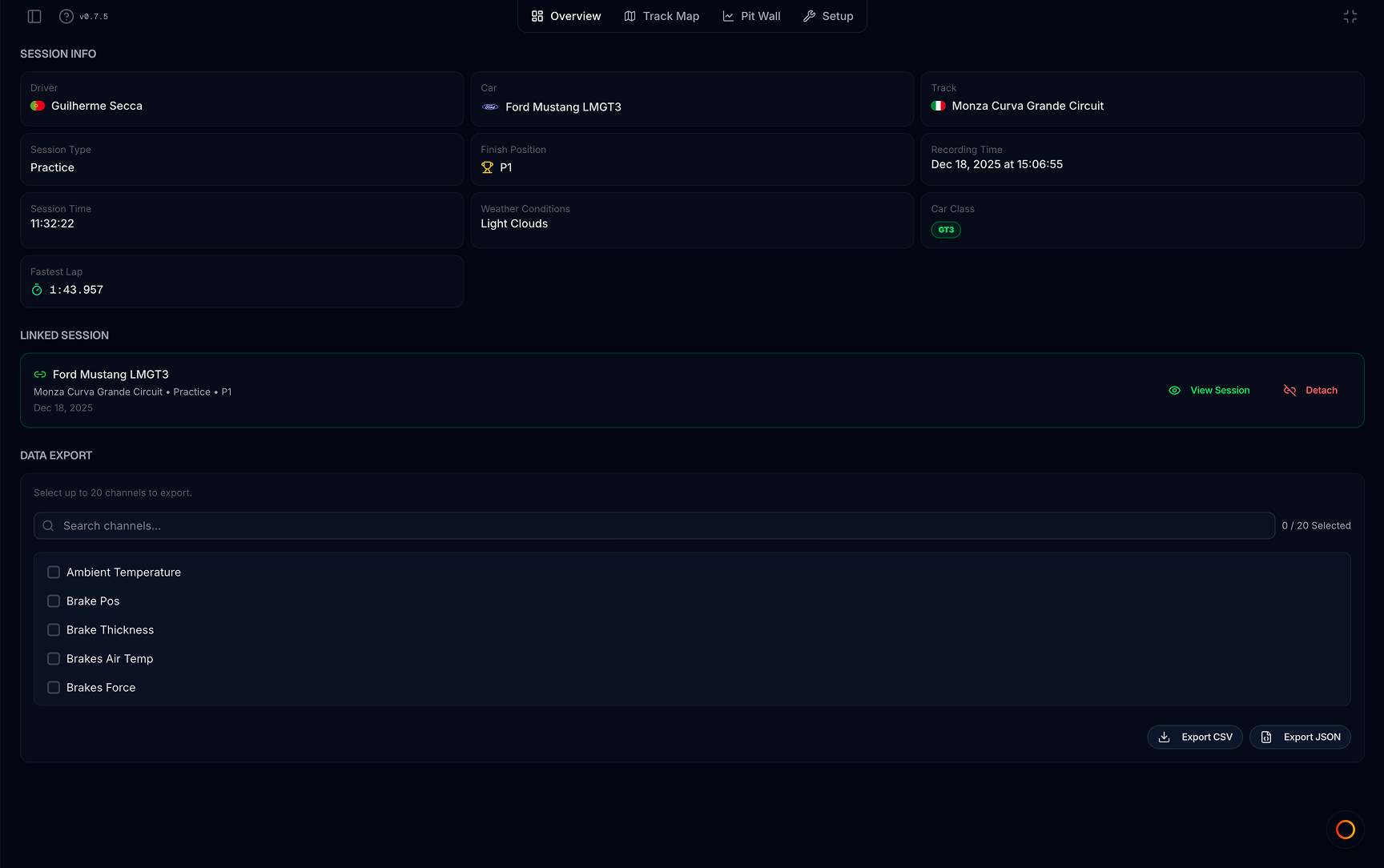
Overview tab — session info, linked session, and data export

Where to find it

Open any file in the viewer → click Overview in the tab bar (first tab, left of Track Map).

Session Info

A grid of cards pulled from the recording and any linked race session:

  • Driver — name from the file (your flag shows when it matches your profile)
  • Car — canonical car name and class badge
  • Track — layout name with country flag
  • Session type — practice, qualifying, race, etc.
  • Finish position — when the file is linked to a race result
  • Fastest lap — best lap time from file metadata or events
  • Other metadata — recording time, weather, car class, and other fields stored in the file

There is no lap-by-lap list or chart preview on this tab. Lap times and replay live on Track Map; stint charts and custom channels are on Pit Wall.

Linked Session

Connect this telemetry file to a race session in your MyLMU library:

  • Attach Session — match by track layout and recording time when nothing is linked yet
  • View Session — open the linked race page
  • Detach — remove the link without deleting the telemetry file

Linking adds context such as finish position and makes it easier to jump between telemetry and session results. See Linking to sessions.

Data Export (Pro)

Pro subscribers can export raw channel data from the Data Export section:

  1. Search and select up to 20 channels
  2. Export CSV or Export JSON for the selected channels

Free plans see an upgrade prompt here. Channel charts and replay do not require export — use Track Map or Pit Wall for in-browser analysis.

When to use it

  • Confirm the right file opened (driver, car, track, session type)
  • Check fastest lap before comparing on Track Map
  • Attach or review the linked race session
  • Download raw telemetry for external tools (Pro)

Related

  • Track Map — default tab; lap replay, traces, and ghosts
  • Linking to sessions
  • Free vs Pro — export and other limits

Was this page helpful?

PreviousTelemetry ViewerNextTrack Map

On this page

  • Where to find it
  • Session Info
  • Linked Session
  • Data Export (Pro)
  • When to use it
  • Related

Was this page helpful?

Documentation

  • Getting started
  • Product overview
  • Sessions
  • MyLMU Telemetry
  • MyLMU Sync Agent
  • MyLMU Coach (AI)
  • Teams
  • Rankings
  • Community
  • Misc

Product

  • Open dashboard
  • Sync Agent
  • Contact
  • Pricing
  • Changelog
  • FAQs
  • Branding

Community

  • Instagram
  • Community forum
  • YouTube
  • X

© 2026 MyLMU

•Privacy Policy•Terms of Service•Cookie Policy