



The Events view lists telemetry events — discrete logged moments such as pit signals, flags, and game-reported state changes — and overlays them with continuous driver channels for lap review. For continuous traces alone use Inspector.
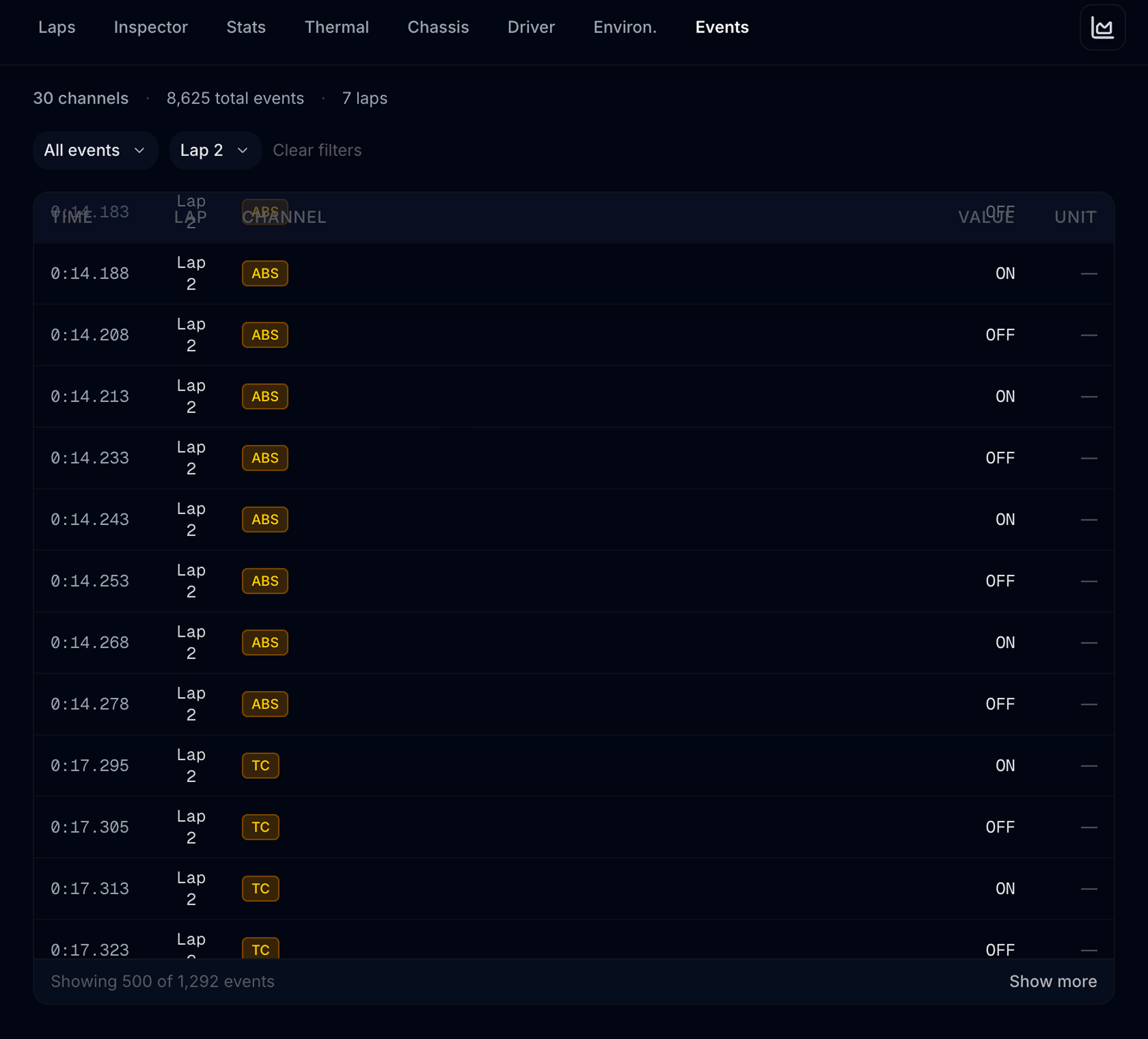
Open Pit Wall → Events tab.
Events respect lap scope from Stint analysis — only events on laps in scope appear. You can narrow further with the lap filter below.
Summary row
At the top:
| Stat | Meaning |
|---|---|
| Channels | How many distinct event channel types exist in scope |
| Total events | All event rows in scope |
| Laps | Lap count represented |
| Shown | Row count after filters (when filters active) |
Plots
Above the table (when events match the current filters):
| Plot | What it shows |
|---|---|
| Session timeline | Swimlanes per event channel (In Pits, TC, Yellow Flag, …), ordered by category with a colour rail and per-lane counts. Quiet lanes show individual dots; busy lanes (TC, ABS, SurfaceTypes) switch to a density band where a darker column means more events. Vertical guides mark lap starts. Hover for detail, click to filter. |
| Driver lap strip | When a single lap is filtered (or scope has one lap): Brake, Throttle, and Speed vs Lap Dist, with dashed markers where high-signal events map onto distance. Requires Lap Dist samples with timestamps. Hovering the strip moves the track-map position dots; event ticks for this lap also appear on the map. |
| Event × lap | Heatmap of event counts for the busiest event types across laps. Click a cell to filter event + lap. |
| State over time | When the channel filter is a level/map series (TCLevel, ABSLevel, bias, wetness, …): stepped value vs time. |
| State dwell | Same filter: share of time held at each level between events. |
Click to filter
- Timeline marker or heatmap cell → sets channel and/or lap filters, then scrolls to the table.
- Driver lap strip header Inspect lap → opens Inspector Custom view on that lap with Brake / Throttle / Speed overlays (and hover distance when available).
- Toolbar Inspect lap appears when a lap filter is active (tooltip explains the jump).
Both filter actions reset the visible row count to 500 (same as changing the dropdowns).
Filters
| Filter | How to use |
|---|---|
| Channel | Dropdown grouped by category; each option shows event count. Pick one channel to see only those rows. Default All events shows everything in scope. |
| Lap | Limit to a single lap within the active scope — enables the driver lap strip. |
Clear filters resets both dropdowns without changing stint scope. To widen laps again, use Clear filter on the scope banner or Laps → All.
Event table
| Column | Content |
|---|---|
| Time | Timestamp within the session |
| Lap | Lap number when the event fired |
| Channel | Event name (colour-coded badge) |
| Value | Logged value |
| Unit | Unit when provided |
Rows are sorted in session order. The table scrolls inside a fixed height; the header stays visible while scrolling.
Pagination
Loads 500 rows at a time. When more rows match your filters, a footer shows Showing 500 of N events with Show more.
If nothing matches: No events match the current filters. Plots hide when the filtered set is empty.
vs Inspector
| Inspector | Events | |
|---|---|---|
| Data type | Continuous traces vs lap distance | Discrete event rows (+ optional distance overlay) |
| Lap selection | Base / Compare overlay | Scope + optional single-lap filter |
| Best for | Pedal traces, tyre pressure curves | Pit in/out, flags, aids, level changes — and where they sit on the lap |
| Search | Channel presets | Channel dropdown; timeline / heatmap clicks; Inspect lap |
Example: Filter Events to a race lap → read the driver lap strip for ABS/TC ticks on brake zones → Inspect lap to scrub the same distance with full overlays.
Workflows
| Goal | Steps |
|---|---|
| Audit pit stops | Scope stint → heatmap or timeline → filter pit lap |
| Find flag / aids moments | Click timeline markers → read table timestamps |
| Track TC / ABS levels | Filter TCLevel / ABSLevel → step chart + dwell |
| Review one lap with pedals | Set Lap filter → driver lap strip → Inspect lap |
| Compare two stints | Scope Stint 1 → note heatmap → Stint 2 → compare |
Related
- Stint analysis — stint detection uses pit events
- Inspector
- Pit Wall overview